
📑Table of Contents:
- Why In-Store SMS Opt-Ins Convert So Well
- The Biggest Mistake: Asking for a Number Without a Clear Benefit
- Consent Basics in Plain English
- Choose the Right In-Store Opt-In Method
- The Fastest Staff Script That Still Feels Human
- How to Handle Disclosures Without a Long Speech
- Use Micro-Incentives That Don’t Hurt Margin
- Train Staff for Consistency and Speed
- Design the Flow to Avoid Typos and Slowdowns
- Set Up a Strong Welcome Message
- Use Smart Segments to Keep In-Store Subscribers Engaged
- Common Scenarios and How to Respond Fast
- Metrics That Tell You If It’s Working
- Common Mistakes That Slow Checkout or Hurt Compliance
- Final Thoughts
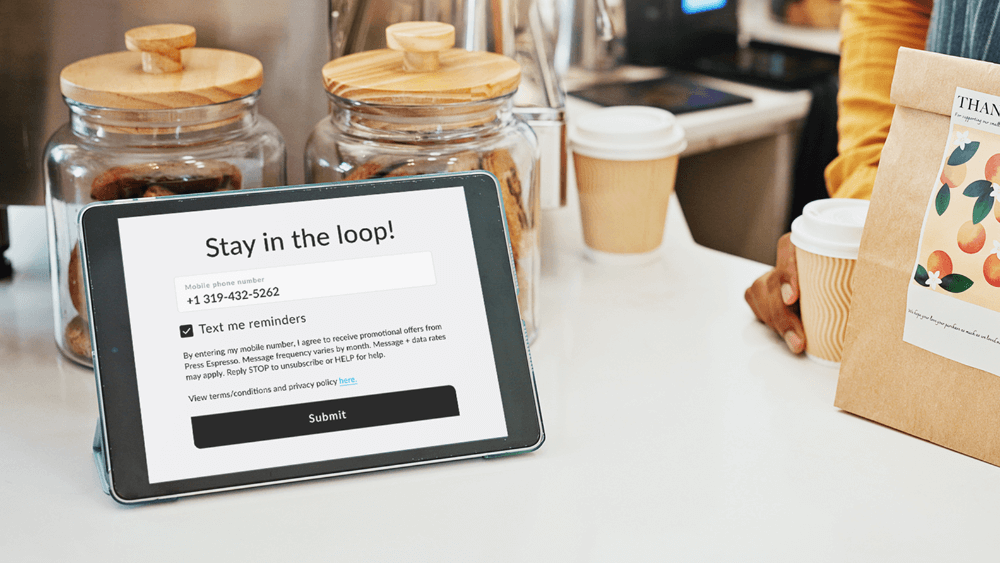
In-store SMS list growth can be your highest-quality acquisition channel. People who buy in person already trust you. They also have high intent to return. Therefore, an in-store opt-in often outperforms online pop-ups and generic social pushes.
However, the register is not a marketing stage. It is a speed stage. Customers want to pay and leave. Staff want to keep the line moving. So, if you collect SMS consent the wrong way, you create friction and frustration. Worse, you collect “yes” answers that aren’t truly informed, which can lead to complaints later.
The solution is simple, but not lazy. You need a short script, a fast flow, and clear disclosures that don’t overwhelm the moment. Additionally, you need a system that captures consent proof automatically so your team stays protected.
This guide shows how to collect SMS consent in-store without slowing checkout. You’ll learn what to say, where to place prompts, which opt-in methods work best, and how to keep everything compliant and customer-friendly.
Why In-Store SMS Opt-Ins Convert So Well
In-store opt-ins work because trust already exists. Customers see your location, your staff, and your product quality in real time. Therefore, giving a phone number feels less risky than handing it to a random website.
Also, in-store moments often connect to repeat behavior. A customer may want restock alerts, receipt access, loyalty points, or exclusive local deals. So, the value feels immediate.
However, customers still protect their numbers. So, your pitch must be specific, and your flow must be effortless.
The Biggest Mistake: Asking for a Number Without a Clear Benefit
Many stores ask, “What’s your phone number?” as if it’s routine. Customers hesitate because they don’t know why you want it. Some will say no. Others will say yes and regret it later. Therefore, unclear framing hurts conversion and trust.
Instead, lead with the benefit first. Then ask for consent. For example, “Want text receipts and VIP restock alerts?” works better than “Can I get your number?”
This change takes only two seconds, yet it completely changes the emotional tone
Consent Basics in Plain English
You should treat SMS consent like a promise. The customer agrees to receive messages. You agree to honor expectations.
Therefore, your opt-in must include three basics.
First, identity: customers should know who the brand is that’s sending the texts.
Second, purpose: customers should know what types of messages they will receive.
Third, control: customers should know how to opt out.
Also, keep the disclosure visible. A quick line like “Msg & data rates may apply. Reply STOP to opt out” works in many contexts.
If your program includes marketing messages, not just transactional updates, use language that clearly reflects that—also, store proof of consent with the date and source.
Choose the Right In-Store Opt-In Method
Not every store environment is the same. So, choose the method that best matches your traffic, POS setup, and customer behavior.
Here are the most practical options, and each one can stay fast when implemented correctly.
Method 1: POS Prompt at Checkout
A POS prompt is the most direct method. It also integrates cleanly into the transaction.
The key is timing. Add the prompt after scanning items but before payment completion. That moment is short, yet it’s still natural.
However, keep the interaction optional. The staff should ask once, then move on. If they push, checkout slows and trust drops.
Best use: retail stores with modern POS systems and fast staff workflows.
Method 2: QR Code Self-Opt-In at the Counter
QR opt-ins shift work from staff to the customer. Therefore, they can reduce checkout friction.
Place the QR code where people naturally look, such as the payment terminal area, the counter mat, or a small sign at eye level. Then provide one clear benefit and one clear instruction.
Example signage: “Get text receipts + VIP restock alerts. Scan to join.”
Because the customer does it themselves, the line keeps moving.
Best use: high-volume stores, cafes, and busy counters.
Method 3: Receipt and Packaging Opt-Ins
Receipts and bag inserts catch customers after checkout. Therefore, they never slow the line.
Use a short prompt and a QR code. Also, offer a specific perk, such as “Text for restock alerts” or “Join for members-only drops.”
This method works especially well when you sell replenishable items. It also works when customers tend to return, such as in specialty retail.
Best use: stores with high foot traffic and repeat buyers.
Method 4: Text-to-Join Keyword on Signage
Text-to-join is simple. It also works on any phone.
For example: “Text VIP to 12345 to join.”
However, it can create friction if customers need to do it during checkout. So, place it where they can do it while waiting, not while paying.
Best use: stores with short wait lines or browse time.
Method 5: Loyalty Enrollment as the Opt-In Bridge
Loyalty programs create a natural reason to share a phone number. Therefore, loyalty enrollment often boosts SMS opt-in rates.
However, keep loyalty signup lightweight. If loyalty requires full account creation, checkout slows. Instead, allow “phone number first” enrollment, then collect details later.
Best use: stores with loyalty programs and repeat customers.
The Fastest Staff Script That Still Feels Human

Staff scripts should be short. They should also be consistent. When scripts vary too much, compliance risk rises, and conversion becomes unpredictable.
Use a one-sentence offer, then a yes/no question.
- Script option A: “Want text receipts and restock alerts? It’s about 2 texts a week.”
- Script option B: “Want VIP texts for new drops and specials? You can opt out anytime.”
- Script option C: “Want a quick heads-up by text when your size restocks?”
Then, if they say yes, the staff asks for the number. If they say no, the staff moves on immediately.
Because speed matters, the script must fit in five seconds.
How to Handle Disclosures Without a Long Speech
Disclosures matter, but long disclosures slow checkout. Therefore, use layered disclosure.
- Layer one is verbal and short. “You can opt out anytime.”
- Layer two is visual on the terminal, receipt, or QR opt-in page. “Msg & data rates may apply. Reply STOP.”
This approach keeps checkout fast while clearly setting expectations.
Also, keep your opt-in page clean. Put the benefit first. Then show the disclosure below. Customers read more when they are not overwhelmed.
Use Micro-Incentives That Don’t Hurt Margin
In-store opt-ins often convert without discounts because trust is high. However, a small perk can help.
Good low-cost perks include:
- Text receipts plus easy returns
- Early access to drops
- Restock alerts for popular items
- A small bonus reward in loyalty points
- A monthly giveaway entry
If you use discounts, keep them modest. Otherwise, you attract deal hunters, which reduces profitability.
Because the goal is a healthy list, not a big list, incentives should support behavior, not bribe it.
Train Staff for Consistency and Speed
Even the best system fails if staff avoid it or execute it inconsistently. Therefore, training matters.
Train the “why” first. Explain that SMS opt-ins reduce future marketing costs and increase repeat purchases. Then train the “how” with short roleplay.
Give staff two scripts, not ten. Also, set one rule: ask once, then move on.
Additionally, measure opt-in rates by shift and location. When you share results, staff see progress and adopt the habit faster.
Design the Flow to Avoid Typos and Slowdowns
Manual number entry can slow down checkout and create errors. Therefore, reduce typing whenever possible.
If your POS supports it, let customers type their number on the payment terminal. That is faster and more private.
If you use QR opt-ins, customers enter the code on their own phone, which also reduces errors.
If staff must type the number, confirm it once. However, do not ask for it twice, because that slows the line.
Also, send a confirmation text immediately. That step verifies the number and sets expectations in a single step.
Set Up a Strong Welcome Message
Your welcome message is where you prevent regret. It should confirm enrollment, set expectations for frequency, and explain which messages include.
Example welcome: “{Brand}: You’re in. Expect 2–4 texts/month with VIP drops and restock alerts. Reply STOP to opt out.”
This message reduces confusion. Therefore, it reduces opt-outs and complaints.
Use Smart Segments to Keep In-Store Subscribers Engaged
In-store subscribers often want local value. Therefore, segment them by store location or region.
Send store-specific updates such as local events, in-store specials, and restocks. Avoid blasting irrelevant national promos too often.
Also, use purchase-based segmentation when possible. If someone buys shoes, send shoe-related drops. Relevance protects trust.
Because SMS is personal, segmentation keeps it from feeling spammy.
Common Scenarios and How to Respond Fast
Customers ask questions at checkout. Your staff should have quick answers.
- If they ask, “How often do you text?” the staff says, “Usually 2 texts a week, and you can opt out anytime.”
- If they ask, “Is this for receipts or marketing?” the staff says, “Receipts and updates, plus optional VIP offers.”
- If they ask, “Will you share my number?” the staff says, “No, we only use it for our messages.”
These responses keep the line moving while building trust.
Metrics That Tell You If It’s Working
Track a few numbers weekly.
- Opt-in rate per transaction: This shows how well checkout prompts perform.
- Opt-in method mix: This shows whether QR, POS, or receipts drive the most growth.
- Opt-out rate in the first 7 days: This reveals an expectation mismatch.
- Revenue per subscriber: This shows long-term value, not just list size.
Also, track staff adoption. If the opt-in rate varies wildly by shift, training likely needs improvement.
Common Mistakes That Slow Checkout or Hurt Compliance
Some stores ask for numbers too early. That interrupts scanning and creates awkward pauses. Instead, ask for payment.
Some stores push too hard. That creates discomfort and slows everything. Ask once, then move on.
Some stores hide disclosures. That can lead to regret and complaints. Use layered disclosure instead.
Finally, some stores never confirm enrollment. Then, customers feel surprised later. A welcome message fixes this.

Final Thoughts
You can collect SMS consent in-store without slowing down checkout when you design the process for speed. Lead with a clear benefit. Use a short script. Offer self-serve opt-in via QR or terminal entry. Then back it up with clear, layered disclosures and a strong welcome message.
Most importantly, treat consent like a trust exchange. When customers understand what they’re signing up for, they stay subscribed, and they buy again. That is the real win.